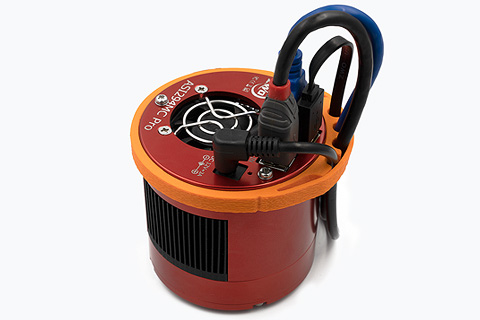
Cable organizer for astrophotography cameras
Easy-to-make flexible cable guide band
If your cables are tangled and creating chaos in your astrophotography setup, you can make elegant bands to bring order and elegance.
Table of contents
Files
All files for 3D printing have been packed into a single archive, which you can download here:
- CS.zip - 3MF files for cable organizer
The downloadable file package includes camera bands of various diameters, suitable for most popular camera models:
-
90 mm diameter:
- ZWO ASI: 2400 MC Pro, 2600 MC/MM Pro|Air|Duo, 4400 MC Pro, 6200 MM/MC Pro, ZWO ASI461MM Pro
- QHY: 168 C Pro, 268 M/C Pro, 294 M/C Pro, 533 M/C Pro
-
89 mm diameter:
- ToupTek SkyEye series
-
86 mm diameter:
- ZWO ASI 071 MC Pro
-
80 mm diameter:
- ToupTek ATR series
- Ogma
-
78 mm diameter:
- ZWO ASI: 1600MM Pro, 294 MM/MC Pro, ZWO 183 MM/MC Pro, 585 MM/MC Pro|Air, 990 MM Pro, 992 MM Pro
- Svybony: SV405CC, SV605CC
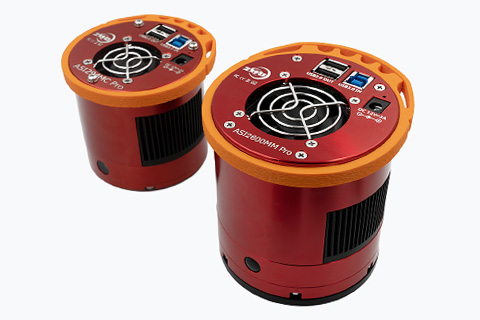
Of course, different camera models from different manufacturers have different diameters, so if you cannot find the size for your camera in the ready-made printable file package, simply scale the band in the XY plane in the slicer to fit your device model.
Description
The band consists of only one element. Just print it out and put it on the camera.
The element should be made of flexible filament, e.g., TPU with a Shore hardness of approximately A95. As with any flexible filament, print speeds should be very low.
An interesting aesthetic technique that I think looks good on these bands is fuzzy skin, available in some slicers (e.g., PsusaSlicer). It allows you to achieve a slightly rough surface, which gives the band an even more elegant look.
If you decide to use this option, print the first two layers and the last two layers normally and the rest with fuzzy skin. The name and parameters of this option may vary in different print preparation programs, but in PsusaSlicer, for example, a surface with the following parameters looks good: “fuzzy skin distance”: 0.8, “fuzzy skin thickness”: 0.2.
Of course, this is only a possible aesthetic addition, and the band works very well even when printed in the standard way.